
Rummikub®
KinkajooBoard
4.56.29K Reviews
- Version
- 4.13.10
- Installs
- 10.00M
- Age Rating
- Everyone
Screenshots



Our Review of Rummikub®
 Analysis by Appyee
Ah, Rummikub®! If you're anything like me, you probably love a good game that challenges your brain while keeping you entertained. Well, let me tell you, this classic tile game, now available on Android and iOS, is just the ticket! Whether you're a seasoned pro or a newbie, you'll find something to love in this digital adaptation.
Why the First Few Games Click
My first few rounds felt familiar quickly: the appeal is in spotting ways to rearrange numbered tiles into useful groups, then deciding whether to play now or wait for a better opening. That mix makes a short session feel active without requiring a long tutorial or a complicated board to learn. If you already know the tabletop game, the digital version is easy to approach; if you do not, the tutorial gives you a starting point.
The opening appeal is strongest when I have a few minutes to spare and want more than a passive distraction. A round asks me to pay attention, but the basic idea is simple enough to pick up without setting aside an evening. I would recommend it to someone who likes pattern-finding and tactical choices, especially if they enjoy games that create small, satisfying decisions rather than relying on quick reflexes.
What Keeps a Tile Game Interesting
Rummikub® is a board game from Kinkajoo, and its enduring hook is how a board state can change when a player rearranges the tiles already in play. It is not only a matter of holding a good set of numbers; I have to consider what can be built from the shared layout and whether changing it will help me finish my own move. That makes the game feel more flexible than many straightforward turn-based board games.
This flexibility also gives the game a learning curve that outlasts the rules. New players can focus on making legal combinations, while experienced players can think several moves ahead and weigh whether a promising rearrangement leaves useful options for someone else. A practical habit is to scan the table before concentrating on the tiles in your rack: the shared arrangement may create a route you would miss if you only look for an obvious set in your hand.
Against a simple matching or dice game, this asks for more concentration and planning. Compared with other digital board games, it is less about mastering a large rulebook and more about reading the changing arrangement in front of you. That makes it a good fit for people who want strategy in approachable rounds, but a less natural choice for anyone looking for a story, fast action, or a game that can be played without much thought.
Making It a Habit, Not Just a Novelty
The app has a 4.6 average from around 290,000 ratings, and it has been installed over 10 million times. Those figures suggest a broad audience, but what matters more to me is whether it gives a regular player a reason to return. The varied ways to play described in the game can help: a solo match is a low-pressure place to practise, while playing with other people changes the pace and makes the decisions less predictable.
A realistic use case is a quiet break after dinner. I can start a round when I have enough time to focus, then choose a more competitive match when I want interaction rather than practice. If I am trying to improve, I would treat solo games as a place to test how different tile arrangements work, not as proof that a strategy will always succeed against people. Human opponents can make very different choices from an AI, and adapting to that is part of the appeal.
That variation helps the game hold its space on a phone, but it does not make every session equally fresh. The core activity remains arranging tiles, so someone who quickly tires of repeating a familiar ruleset may find that additional matches feel like more of the same. I would not install it expecting a constant stream of new content; I would keep it for the pleasure of a system that rewards attention and gradually better judgement.
Playing, Practising, and Staying Power
I find that the lasting appeal of Rummikub comes less from adding something new and more from giving familiar rules room to reward better judgement. In this section, I look at how practice, different opponents, and small choices around when to play can keep the game worthwhile beyond the first few sessions.
Getting Started with Rummikub®
First things first, downloading the game was a breeze. The app is available on both Google Play and the App Store, so no worries about compatibility. Once installed, you're greeted with a clean, colorful interface that immediately sets the tone for some fun. The app walks you through a quick tutorial, which is perfect if you’re not familiar with the game or need a refresher.
It is free to download, with a Everyone content rating, and the current version is 4.12.12. The listed minimum OS is 7.0. Those details make it approachable for a wide range of players, though I would still check that my device runs a compatible system before installing. The game also has in-app purchases ranging from $2.99 to $99.99 per item, so I would make a point of checking purchase prompts rather than assuming every optional extra is inexpensive.
Game Modes: More Than You Expect
Rummikub® offers several game modes to keep things interesting. You can play solo against AI, which is great for honing your skills. The AI can be adjusted from easy to hard, so you can tailor the challenge to your liking. Then there's the multiplayer mode, which is where the real fun begins.
Connecting with friends is super easy, and you can even join random games to meet new players from around the world. There's something incredibly satisfying about strategizing your next move and keeping your opponents guessing. Plus, there’s a chat feature that lets you communicate with other players, making it feel like you’re all sitting around a table together.
For someone deciding between solo and multiplayer, I would use solo play when I want an unhurried practice round and multiplayer when I want the uncertainty of other people’s decisions. The latter is the better fit for a social session, but it also means the experience depends on the people in the match. If I only want a reliable, quiet puzzle, playing against the AI is the simpler choice; if I want the feeling of a shared table, playing with others is where the format comes alive.
One small strategic tip is to avoid treating every playable move as an automatic improvement. Sometimes holding back a tile can preserve flexibility for a later turn, while an early rearrangement may give opponents a more useful layout. That trade-off is what makes practice worthwhile: a move can be legal and still be less helpful than waiting or choosing another combination.
User Interface: Simple and Intuitive
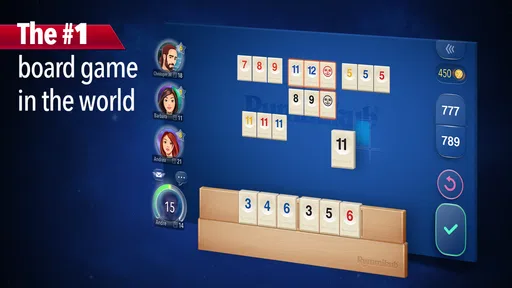
The user interface is a highlight for me. It's straightforward and intuitive, which means you spend more time playing and less time figuring out what to do. The tiles are easy to drag and drop, and the layout is just like the physical game, which makes it feel familiar. The app also offers customization options, so you can change the background or tile designs to suit your style.
On a phone, tile placement is the part I would pay attention to most. A busy board can make it harder to inspect possible combinations at a glance, particularly if I am playing quickly or using a smaller screen. I find it sensible to pause before confirming a complicated rearrangement and check the whole table rather than focus only on the tiles I am moving. The familiar layout helps, but a touchscreen is still different from spreading physical tiles across a table.
The customization options are useful in a modest, practical way: a preferred background or tile design can make repeated sessions feel more comfortable. They do not change the underlying decisions, so I would treat them as personal touches rather than reasons to keep playing. If visual novelty is the main thing I want from a game, these choices alone are unlikely to provide lasting variety.
Features: More Than Just a Game
One of the coolest features of Rummikub® is the ability to track your statistics. You can see your win/loss ratio, the number of games played, and even how you stack up against friends. This adds a competitive edge that keeps you coming back for more.
Statistics can be more useful as a reflection tool than as a score to chase. I would look at them after a run of games and ask whether I am taking the same risks each time, rather than treating a single result as a verdict on my ability. Comparing results with friends can add a friendly goal, but it can also make casual play feel more competitive than intended. If I want a relaxed break, I would focus on the match itself and leave the numbers for another time.
Additionally, the app supports multiple languages, making it accessible to players around the globe. And for those who like to play on the go, the game saves your progress automatically, so you never lose your place if you have to step away.
That automatic saving is especially handy when a normal interruption arrives: I might need to answer a message or put my phone down before I finish. It makes the game more practical for brief breaks than a format that demands uninterrupted attention. Still, I would start a round only when I have a reasonable chance to return to it; a saved game is convenient, but it does not remove the mental effort of picking up a complicated board position later.
In-App Purchases: Worth It?
The app is free to download, but like many games today, it comes with in-app purchases. These can enhance your experience by unlocking ad-free play or additional tile sets. While the ads can be a bit pesky, they're not overly intrusive, and playing for free is entirely feasible.
My advice is to try the free version first and decide what actually bothers you before spending. If an optional purchase addresses a specific annoyance or gives you a cosmetic choice you genuinely want, it may make sense for your routine. If you are only curious about the game, there is no reason to buy something before learning whether the core tile play keeps your attention. The range of item prices makes it worth checking the amount shown on each purchase screen, especially if children use the device.
For those who fall in love with the game, the in-app purchases are worth considering, especially if you want to support the developers. It’s a small price to pay for hours of entertainment!
I would qualify that recommendation: whether a purchase feels worthwhile depends on what it offers and how often you play. A cosmetic change has little value to someone who barely notices the board’s appearance, while a player who spends many evenings with the game may care more about comfort and presentation. The key question is not whether a purchase is available, but whether it improves the part of the experience you personally return for.
When the Routine Starts to Wear
The main maintenance burden is low: I do not need to manage a collection of physical tiles or set up a table, and I can return to a saved game after stepping away. The trade-off is that a phone game can turn into a default habit. If I open it automatically whenever I have a spare moment, the familiar format may begin to feel repetitive rather than relaxing. I would keep it in rotation for deliberate rounds, not use it to fill every quiet minute.
It is also not ideal for every social situation. If the people I am with want a shared physical activity, an actual tile set is better because everyone can gather around the same table and read the board together. If I want a quick solo challenge, the app is more convenient; if the point is face-to-face conversation, a screen can get in the way. Likewise, players who prefer a fast game with little planning may find the turns too deliberate.
For long-term enjoyment, I would vary the purpose of each session: practise one kind of decision alone, play casually with friends another time, and use the statistics only when I want to reflect on progress. That approach makes the familiar rules serve different moods without pretending the game itself changes dramatically. If even that feels repetitive, a different board game with a more varied objective is probably a better choice.
Final Thoughts
In conclusion, Rummikub® on mobile offers a fantastic way to enjoy this classic game anytime, anywhere. It’s perfect for quick ten-minute sessions or longer matchups with friends. With its user-friendly interface, variety of game modes, and social features, it’s easy to see why it’s a hit among players.
So, if you're looking for a game that will test your strategic skills and provide endless entertainment, give it a try. Trust me, you won’t be disappointed!
My more measured verdict is that the game earns a lasting place on my phone if I enjoy returning to the same tactical puzzle and can choose between practising alone and playing socially. Its release date is October 3, 2017, and its continued appeal comes from the familiar rules being easy to revisit, not from a promise of constant reinvention. I would recommend it to patient players who like rearranging possibilities and learning from each round; I would skip it if I mainly want novelty, rapid action, or an always-changing challenge. For the right player, the lasting value is simple: a well-known tabletop pastime that is ready when a real game night is not.
Verdict
Strengths of Rummikub®
- Engaging multiplayer mode enhances fun.
- Smooth and intuitive user interface.
- Customizable game settings for flexibility.
- Offline play available for convenience.
- Regular updates with new features.
Limitations of Rummikub®
- Limited free features without in-app purchases.
- Occasional connectivity issues in multiplayer.
- Ads can be intrusive during gameplay.
- Game might lag on older devices.
- Tutorial lacks depth for beginners.
Other Releases by Kinkajoo
View All
Rummikub
Board4.3
Similar Picks in This Category
View All
Ludo King®
Gametion4.1

Ludo
Yarsa Games4.6

Tile Master® - Matching Game
Higgs Studio3.6

Checkers Online
CC Games4.6

Dominoes
Loop Games4.7

Chess
Chess Prince4.6
Frequently Asked Questions
What is Rummikub® and how do you play it?
Rummikub® is a popular tile-based game that combines elements of rummy and mahjong. Players draw and discard tiles to form sets and runs, aiming to be the first to use all their tiles. The app version offers both single-player and multiplayer modes, with intuitive controls and various difficulty levels.
Is Rummikub® available for both Android and iOS devices?
Yes, Rummikub® is available for download on both Android and iOS platforms. You can find it on the Google Play Store and Apple App Store. Simply search for "Rummikub®" to download and install the game, ensuring compatibility with your device's operating system.
Does the Rummikub® app offer multiplayer options?
The Rummikub® app offers robust multiplayer features, allowing you to compete against friends or random opponents online. You can invite friends through social media or connect with players worldwide. The app includes chat functionality for interaction during gameplay, enhancing the social experience.
Are there in-app purchases in Rummikub®?
Rummikub® includes optional in-app purchases that allow players to buy additional features, such as ad-free gameplay and special tile designs. While the base game is free, these purchases can enhance your experience. It's important to manage settings to prevent unintended purchases, especially for younger players.
What are the main features of the Rummikub® app?
The Rummikub® app boasts several features, including customizable game settings, various difficulty levels, and a tutorial for newcomers. It also offers daily challenges and leaderboards to track your progress. The app's clean interface and smooth animations make for an enjoyable gaming experience.
Play our best games!


